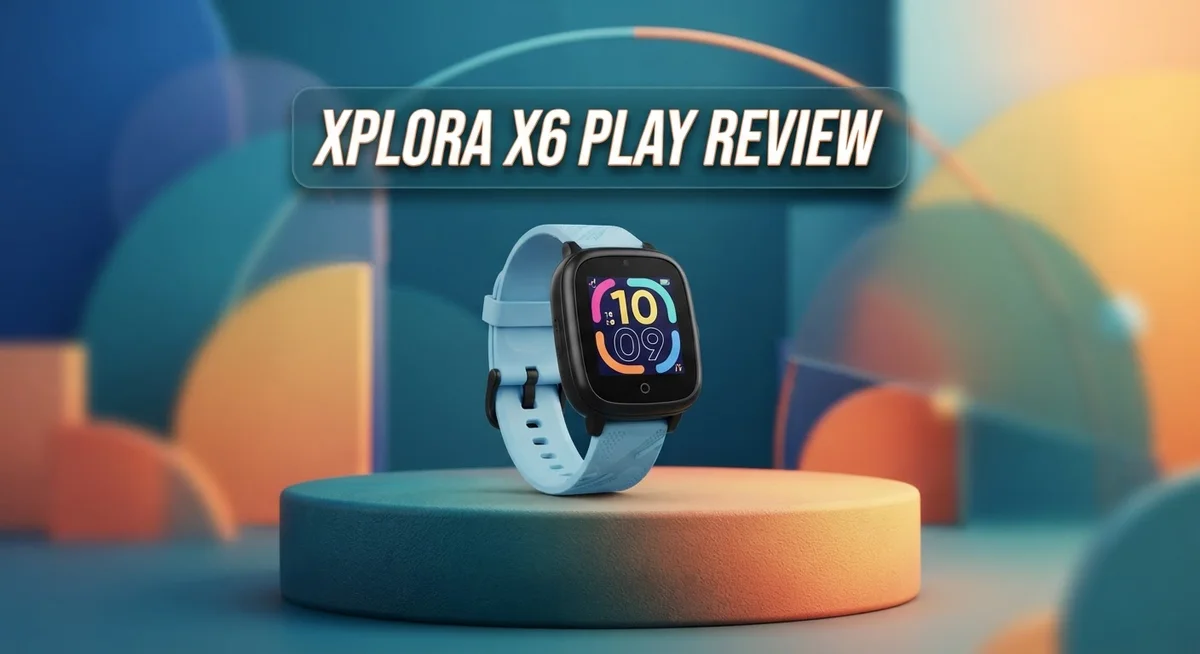
Xplora X6 Play Review 2026: Live Up To The Hype?
Parents want their kids to stay safe. But they also want to skip giving them a phone too early. The Xplora X6 Play solves this problem well.
This smartwatch works like a phone but stays kid friendly. It offers GPS tracking, voice calls, and text messages. Parents get full control through a simple app.
Kids can send voice messages and fun emojis to friends. They cannot access the internet or social media. This keeps them safe from online risks.
Is the Xplora X6 Play the right choice for your child? This review covers every feature in detail. We look at real performance, common issues, and how it compares to other kids’ smartwatches like the Apple Watch and Garmin Bounce.
Let’s find out if this device earns a spot on your child’s wrist.
In a Nutshell
Here is a quick look at what this smartwatch offers and where it falls short.
- GPS tracking helps parents see their child’s location, though some users report occasional delays in updates.
- School mode and safe zones give parents extra control over when and where the watch can be used.
- The SOS button lets kids call for help fast during an emergency.
- This device has won awards for its design and safety features.
- Some parents mention call connection issues and slow customer support responses.
- Older kids might find the features a bit limited compared to a full smartphone.
- Compared to options like the Apple Watch or Garmin Bounce, the X6 Play focuses purely on safety, not entertainment.
Overall, the Xplora X6 Play works best for younger children who need basic safety tools. It gives parents peace of mind without handing kids a full smartphone. Just keep an eye on tracking accuracy and customer service response times before you commit.
Key Features and Connectivity
The Xplora X6 Play connects kids to parents through 4G connectivity that works like a phone. Your child can make voice calls and send messages without needing their own smartphone. They can share texts, emojis, images, and voice messages with contacts you approve.
GPS tracking shows you where your child is in real time. The watch sends location updates so you always know their whereabouts. Some users report that tracking updates can be delayed by a few minutes, so expect occasional gaps in real time accuracy.
The device includes a dedicated SOS emergency button. When your child presses it, they can call for help immediately. This feature gives parents peace of mind during emergencies or scary situations.
School mode lets you control when the watch can be used. You set the schedule, and the watch automatically locks during class time. This keeps kids focused on learning instead of checking messages.
Safe zones are another powerful parental control. You create digital boundaries around your child’s school, home, or other important locations. The watch alerts you when your child enters or leaves these areas.
One key strength is no internet or social media access. Your child cannot browse the web, download apps, or get distracted by social feeds. Communication stays simple and focused on safety.
Battery life reaches approximately 71 hours between charges. This is solid performance for a kids’ smartwatch. However, real world usage may require daily charging depending on activity level and settings.
The watch works independently without needing a parent smartphone to function. This makes it different from many competitor devices that require a paired phone. Kids get their own communication tool while parents maintain full oversight.
Call connection issues have been reported by some users. Occasionally, calls may fail to connect on the first try. This is worth considering since reliable calling is central to the device’s purpose.
Overall, the X6 Play focuses on communication and safety rather than entertainment features. It keeps older kids connected to parents while blocking distractions that full smartphones introduce.

- Voice Calls - Xplora X6 Play is able to make and receive calls from pre-saved numbers
- Messages - The device can receive texts, emojis, images and voice messages and reply with images, emojis and voice...
Last update on 2026-10-13 / Affiliate links / Images from Amazon Product Advertising API
Safety and Parental Control Features
The Xplora X6 Play puts safety first with features parents actually use. Your child can press the SOS emergency button to call for help instantly when they need it most.
GPS tracking shows you exactly where your child is throughout the day. Parents can see their location on the app in real time. Some users report slight delays in updates, but the feature works well for most families. You get peace of mind knowing you can check in anytime.
School mode gives you control over when the watch works. You can turn it off during class time so kids stay focused on learning. Once school ends, the watch turns back on automatically. This prevents distractions and keeps learning time sacred.
Safe zones let you set specific areas where your child can roam freely. The watch alerts you if your child leaves that area without permission. You can create multiple zones for home, school, or grandma’s house. This feature works quietly in the background without annoying your child.
The watch has no internet or social media access by design. Your child cannot browse the web or get distracted by social apps. They can only use features you approve, like calling and messaging approved contacts. This keeps them focused on real life instead of screens.
Communication happens through 4G connectivity that works like a phone. Kids can send voice messages, texts, emojis, and even images to contacts you approve. Parents receive these messages instantly on their phones. Your child stays connected to family without a full smartphone.
The device works independently without needing a parent smartphone to function. You manage settings through the app, but your child’s watch operates on its own. This means your child gets a real device that feels grown up while staying safe.
Some parents mention that calls occasionally fail to connect. Customer support response times have also been slower than expected for some users. Despite these issues, the safety features work well for families seeking a phone free alternative.
Battery Life and Performance
The Xplora X6 Play delivers solid battery performance for a kids’ smartwatch. The device lasts approximately 71 hours between charges, which translates to roughly three days of typical use.
This battery span works well for the safety watch category. Your child can wear it through school, after-school activities, and several days without you scrambling to find a charger. Most parents appreciate not having to charge it every single night.
However, real-world performance shows some variation. Daily charging becomes necessary if your child uses the watch heavily for calls and messaging. The more active they are with voice calls and sending voice messages, the faster the battery drains. Lighter use patterns stretch the battery closer to that three-day window.
The watch charges via a proprietary connector, so you’ll need the specific cable. Charging typically takes a couple of hours to reach full capacity. Some parents find this convenient since the cable stays dedicated to the device.
What matters most is reliability during the day. The X6 Play maintains enough power to handle emergency situations, GPS tracking, and routine communication throughout your child’s waking hours. The SOS button will work when needed, and location updates continue without interruption.
Performance beyond battery life shows mixed results. Call connection issues have surfaced in user reports, meaning calls sometimes fail to go through or drop unexpectedly. This is concerning for a device marketed as a communication tool. Some users also report tracking delays, where location updates lag behind your child’s actual position.
These performance hiccups don’t affect every user equally. Many families experience reliable service, while others encounter frustrating problems. Customer support response times have been slow according to reports, which compounds frustration when issues arise.
Overall, the battery life meets expectations for the category. The real challenge lies in consistent performance during those three days between charges. You get solid endurance, but real-world reliability requires careful consideration before purchasing.
Top 3 Alternatives
Gizmo Watch 3

- Made from the high quality tempered-glass for maximum scratch protection and no residue when removed
- 2.5D rounded edge glass for comfort on the fingers and hand
Last update on 2026-10-13 / Affiliate links / Images from Amazon Product Advertising API
The Gizmo Watch 3 offers reliable GPS tracking for kids who need constant supervision. This device lets parents monitor location in real time through a simple app. Kids can make calls and send messages to approved contacts only. The watch has a long battery life, lasting several days between charges. Durability matters, and this model handles rough play well. The display is bright and easy to read outdoors. Parents appreciate the geofencing feature that alerts them when kids leave safe zones.
TickTalk 4G

- HD VOICE & VIDEO CALLS: TickTalk 5 is a standalone 4G LTE kids smartwatch that supports voice and video calls through...
- REAL SMS + SECURE MESSAGING: TickTalk 5 now supports real SMS texting and group chats, so kids can send Talk-to-Text...
Last update on 2026-10-13 / Affiliate links / Images from Amazon Product Advertising API
TickTalk 4G brings full cellular connectivity to kids’ wearables. Unlike basic watches, this device works on actual 4G networks, so kids can call and text from anywhere. The watch includes GPS tracking that updates frequently. Parents get a detailed activity log showing where their child has been throughout the day. The interface is intuitive, making it simple for younger users to navigate. Two-way calling means kids can reach parents instantly during emergencies. The screen quality is excellent for reading messages and notifications.
AngelSense GPS Watch

- FREE SERVICE FOR 1st MONTH with easy activation. MONTHLY SUBSCRIPTION REQUIRED: $49.99 per month with a 1-year contract...
- PREMIUM ASSISTIVE TECHNOLOGY: Safest solution for autism, special needs & dementia | Offers continuous, all-day...
Last update on 2026-10-13 / Affiliate links / Images from Amazon Product Advertising API
AngelSense GPS Watch specializes in advanced tracking for children with special needs. The device provides continuous GPS monitoring without relying on cellular service. Battery life extends to several days, reducing charging frequency. Parents receive alerts for unusual movement patterns or location changes. The watch is lightweight and comfortable for all-day wear. Real-time notifications help caregivers stay informed constantly. The platform includes detailed mapping that shows exact routes traveled. This option works well for families needing comprehensive monitoring without complicated features.
Design, Build Quality, and Durability
The Xplora X6 Play shows solid construction that can handle active kids. The watch uses a durable plastic frame that resists bumps and drops during everyday play. The band material feels comfortable on small wrists and doesn’t irritate skin during extended wear.
The device weighs very little, so kids forget they’re wearing it. This lightweight design makes it practical for all-day use without complaints. The screen sits flat against the wrist, reducing the chance of accidental damage from impacts.
Water resistance is a key feature for a kids’ watch. The X6 Play handles splashes and brief water exposure without problems. Kids can wash their hands or play near water without worry. However, you should avoid submerging it in pools or taking it to the beach.
The watch uses a proprietary charging connector, which means you need the specific cable it comes with. This connector sits on the back of the device and charges quickly. You’ll want to keep the cable in a safe spot so it doesn’t get lost.
The band is replaceable, which extends the watch’s lifespan. If the original band wears out or breaks, you can swap it for a new one. This design choice makes sense for a device kids use daily.
Build quality feels solid overall, though some users report minor issues after extended use. The screen occasionally shows responsiveness delays when tapping buttons. These problems don’t happen to every device, but they’re worth knowing about.
The watch handles regular wear and tear reasonably well. It survives accidental drops better than many competitors in this category. The plastic construction keeps it lightweight while maintaining structural integrity.
Durability depends heavily on how carefully your child treats it. Kids who are rough with devices may experience issues sooner. Kids who take care of their belongings will likely get consistent performance from the X6 Play for years of daily use.
Ease of Use and Setup
Getting the Xplora X6 Play up and running takes just a few minutes. You unbox the watch, charge it fully, and then activate it through the parent app on your phone. The process feels straightforward for most families.
The initial setup asks you to create an account and pair the watch with your child’s SIM card. This step requires a compatible 4G SIM, which you’ll need to arrange separately. Once paired, the watch connects to the network automatically and you’re ready to go.
The watch feels intuitive for kids to use. Buttons are large and responsive. The touchscreen menu responds quickly to taps. Your child can navigate between calling, messaging, and the SOS button without confusion. Most kids pick it up within their first day of wearing it.
Parental controls live in the companion app on your phone. You access everything from one dashboard. Adding contacts takes seconds. Setting up school mode requires just a few taps. Creating safe zones involves dropping a pin on a map. The app design keeps things simple so you don’t waste time hunting for features.
Daily operation runs smoothly for most users. Your child can make calls and send messages without your help. The SOS button sits prominently so they can reach you in emergencies. Switching between different modes happens automatically based on your schedule.
One thing to note: the proprietary charging cable means you’ll need to keep track of it. Losing the cable creates a problem since standard chargers won’t work. Consider keeping a backup cable in your bag or car for peace of mind.
The watch doesn’t require constant app interaction once set up. You check in when needed but the device operates independently. This independence is actually a strength. Your child stays connected without needing your phone nearby.
Overall, setup and daily use feel accessible to families of all tech skill levels. Parents appreciate how straightforward everything is. Kids find the interface easy to navigate. The learning curve is minimal, which means less frustration for everyone involved.
Pros and Cons
Pros
- No internet or social media access means kids stay focused on safety, not screen time
- GPS tracking and SOS button give parents real peace of mind during emergencies
- School mode and safe zone alerts let you set boundaries without constant manual checks
- Long battery life keeps the watch running through multiple days of active use
- Voice calls and messaging work without a separate phone, so your child stays connected to you
Cons
- GPS tracking sometimes delays, so location updates may lag behind real time
- Call connections fail occasionally, which defeats the safety purpose when you need it most
- Customer support responds slowly when issues pop up or you need help
- Limited features for older kids, so they may outgrow it quickly if they’re in their tweens or teens
Who Should Buy It
The Xplora X6 Play works best for parents who want a safety focused device without smartphone distractions. If you’re looking for a watch that keeps kids connected to you while blocking social media and internet access, this is a strong fit.
This watch suits children aged 4 to 12 who need basic communication and location tracking. Your child can call you and send messages, but they won’t get distracted by games or apps. The SOS emergency button gives you immediate contact when your child needs help fast.
You’ll appreciate the Xplora X6 Play if you value customizable parental controls. The companion app lets you set school mode, create safe zones, and manage who your child can contact. This approach works well for families who want oversight without constant phone checking.
Consider this watch if your child is responsible enough to wear it daily without losing or damaging it. The proprietary charging cable requires careful storage, and durability depends on how your child treats the device. Rough handling can cause issues over time.
The watch may not suit you if your child is older (13+) or wants advanced features. Kids who expect smartwatch games, fitness tracking, or entertainment will find this limited. The device focuses purely on safety and basic communication.
Skip this option if you need perfect GPS tracking and reliable call connections. Some users report tracking delays and occasional call failures. When emergencies happen, these glitches can be frustrating. Slow customer support also means you won’t get quick help if problems arise.
The Xplora X6 Play shines for families prioritizing safety over features. You get long battery life, simple operation, and peace of mind without worrying about screen time addiction. Parents who want their kids reachable but protected from digital distractions find real value here.
This watch works well in households where simplicity and safety matter more than advanced technology. If your family fits this description, the Xplora X6 Play delivers exactly what you need.
Final Verdict
The Xplora X6 Play stands out as a smart choice for parents who want a simple safety tool for young kids. It combines calling, messaging, and location tracking in one watch. Kids get a sense of independence, and parents get reassurance.
This device competes with names like the Apple Watch and Garmin Bounce. However, the X6 Play focuses purely on safety, not entertainment or fitness tracking. That focus makes it a strong pick for families who want fewer distractions.
Battery life is a genuine highlight. Most competing kids’ watches need daily charging, but this one lasts much longer between charges. That means less hassle for busy parents.
The watch does have some rough edges. Tracking delays and occasional call failures can frustrate parents who need instant updates. Slow customer support adds to that frustration when problems arise.
Still, these issues don’t erase the core value of the product. The SOS button, safe zones, and school mode work as intended most of the time. For everyday use, the watch performs its main job well.
Compared to alternatives like the Gabb Watch 3 or TickTalk 5, the X6 Play holds its own with solid parental controls and a straightforward design. It won’t impress tech enthusiasts looking for smartwatch features, but that’s not its goal.
Younger children who need basic communication and location sharing will benefit most. Older kids who want apps, games, or social features should look elsewhere.
In short, the Xplora X6 Play delivers dependable safety features wrapped in a kid friendly design. Minor performance hiccups exist, but they don’t outweigh the practical benefits.
If you want a device that keeps your child connected without handing them a smartphone, this watch fits the bill. It’s a sensible option for safety focused families who value simplicity over extra features.
Choose the Xplora X6 Play if peace of mind matters more than flashy tech. For most parents of young children, it hits the right balance between function and safety.
Frequently Asked Questions
Does the Xplora X6 Play need a phone to work?
No, your child doesn’t need a separate phone. The watch operates independently with its own 4G connection. Your child can make voice calls and send messages directly from the watch. You manage everything through the parent app on your phone, so you stay in control without giving your child a smartphone.
Can I see where my child is in real time?
Yes, GPS tracking is built in. You can view your child’s location through the parent app. Keep in mind that location updates sometimes lag behind actual movement. This means the map may show where your child was a few minutes ago rather than their current spot. The delay is something to expect, not a deal breaker for most families.
What happens if my child gets lost or needs help fast?
The watch has an SOS emergency button. Your child presses it to call you immediately. This feature works best when call connections are reliable, though some users report occasional connection issues. For added peace of mind, you can set up safe zones. The watch alerts you when your child enters or leaves these areas.
Is this watch good for teenagers?
The Xplora X6 Play works best for younger children aged 4 to 12. Teens typically want more advanced features and communication options. If your child is 13 or older, you might want to explore other options that offer more functionality. The watch is intentionally simple to keep distractions away, which appeals more to younger kids.
How long does the battery last?
Battery life reaches around 71 hours on a single charge. This is solid for a kids’ smartwatch. However, daily charging is still part of the routine for most users. The long battery life means you won’t scramble to charge it mid day during school or outings.

Hi, I’m Emma! I’m that friend who always gets asked “Should I buy this gadget?” – and I love it. After years of being the unofficial tech advisor for family, friends, and coworkers, I realized I had a knack for cutting through marketing hype to find what actually works.